
Joomla Quiz Deluxe is integrated with AlphaUserPoints (AUP). With Joomla Quiz Deluxe powered by AUP you can set how many points a user will receive for each quiz completed in addition to the points earned in the quiz component.
This article was optimized by the PublicistBot.
Want 10 articles per month promoting your business & making you money on autopilot? Activate the PublicistBot for $299.99/year. Add 720 short-form videos for $250 per month more.
Learn More About the Offer in This Article
Send your interest to the appropriate article or offer owner. PMN records the article that generated the enquiry, updates the funnel, logs the activity, sends notifications and adds the lead to PMN Messages.
The exact article is saved with the lead.
The featured offer or redemption link is preserved.
Owners receive messages and email notifications.
The applicant is connected to the campaign source.
Earn points for completing the quiz or assign points for each question assigned.
DOWNLOADING JOOMLA QUIZ:
Joomla Quiz is available for download. Click here to get the software now.
CONFIGURING PLUGINS:
To set up points for the quizzes, do the following:
| 1. | Go to Extensions > Plugin Manager: |

Make Money Building Your Fan Network
Share music, videos, articles, events and contests. Build your network, grow your audience and earn rewards when people connect through you. PMN turns ordinary content into shareable, interactive and trackable experiences designed to help you reach more people and monetize your network. Earn $1.00 for every fan who signs up FREE to support you.
For artists, creators, fans and everyday social media users.
(30-second preview)
IMAGINE THIS POWERING YOUR NEXT RELEASE.
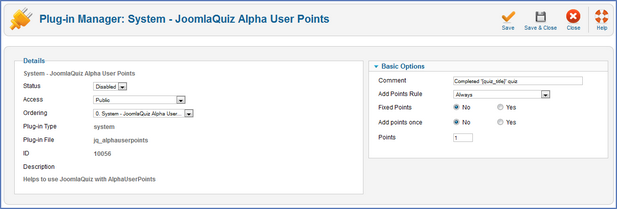
| 2. | Open the settings of the System - JoomlaQuiz Alpha User Points plug-in. |
| 3. | Configure the plug-in parameters: |
| ► | Status - specify the plug-in publication status. |
| ► | Access - specify the plug-in viewing permissions. |
| ► | Ordering - specify the plug-n menu ordering layout. |
| ► | Comment - specify the text announcement for the added points. |
| ► | Add points rule - from the drop-down list, select whether to add the points for every quiz attempt or only when the quiz is passed successfully. |
Turn one article into an ongoing visibility engine.
PublicistBot can keep your business visible with monthly articles, search-friendly distribution, affiliate-aware sharing, and optional AI Marketer video content.
Learn How to Share This Article and Earn $1.00 per Free Enquiry
Ask PMN how referral-aware article sharing works, how eligible free enquiries are attributed, and how Social Rewards are tracked in your account.
The exact article is saved with the lead.
The featured offer or redemption link is preserved.
Owners receive messages and email notifications.
The applicant is connected to the campaign source.
| ► | Add points once - select Yes if you want the points to be added only for the first attempt of the quiz. Otherwise the points will be given for every attempt. |
| ► | Points - set the number of points the user receives for the quiz. |
| 4. | Click Save ( ) to save the changes and stay on this page OR click Save&Close ( ) to save the changes and stay on this page OR click Save&Close ( ) to save the changes and be redirected to the plug-in list. ) to save the changes and be redirected to the plug-in list. |
Want more optimized articles like this?
PMN can create and promote up to 120 PublicistBot articles per year for $299.99/year, with an optional AI Marketer video add-on that adds up to 720 videos for $250 per month more.
Learn How to Earn $90.00 When a User Activates PublicistBot AI Agents
Ask PMN about the PublicistBot referral process, eligibility, attribution, commission tracking and the steps required for a qualifying activation.
The exact article is saved with the lead.
The featured offer or redemption link is preserved.
Owners receive messages and email notifications.
The applicant is connected to the campaign source.