The
This article was optimized by the PublicistBot.
Want 10 articles per month promoting your business & making you money on autopilot? Activate the PublicistBot for $299.99/year. Add 720 short-form videos for $250 per month more.
Learn More About the Offer in This Article
Send your interest to the appropriate article or offer owner. PMN records the article that generated the enquiry, updates the funnel, logs the activity, sends notifications and adds the lead to PMN Messages.
The exact article is saved with the lead.
The featured offer or redemption link is preserved.
Owners receive messages and email notifications.
The applicant is connected to the campaign source.
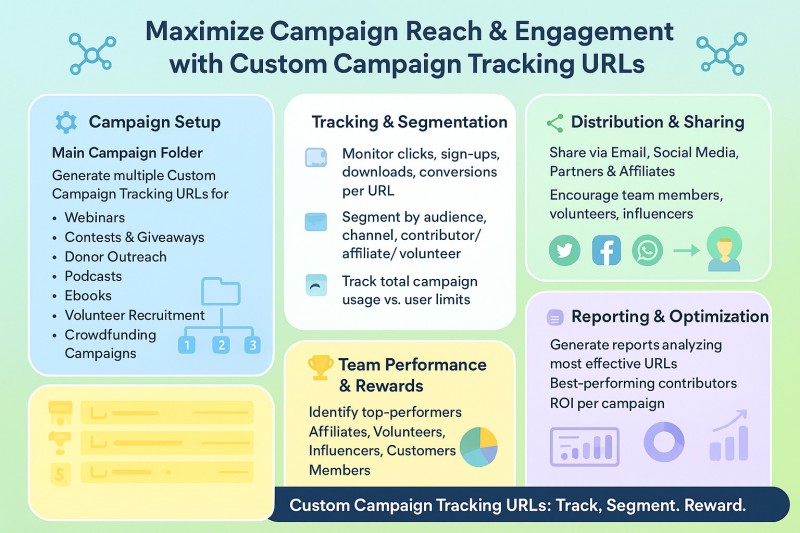
The Custom Campaign Tracking URL Generator empowers registered users of Pamper Me Network to take full control of their digital campaigns. Users can create, manage, and share campaign-specific URLs linked to their personal referral username. The intuitive self-service dashboard makes it simple to monitor usage, track engagement, and promote campaigns across social media, all from one centralized interface.
Designed for efficiency and scalability, this tool ensures every campaign URL is automatically created, validated, and ready to share, while providing actionable insights and optional integrations for rewards and performance tracking. Whether you’re running webinars, contests, fundraising initiatives, podcasts, ebooks, or affiliate campaigns, this system gives users the flexibility, control, and visibility needed to maximize results.
Key Features
1. Main Landing Page Folder Creation
-
Users can generate a main folder with an
index.htmlthat redirects to their personal landing page. -
This folder is created once per user.
-
Automatic redirection ensures that visitors land on the correct URL.
-
Prevents duplicate folder creation via form submission checks.
2. Custom Campaign Tracking URLs
-
Users can create numbered subfolders under their personal folder for multiple campaigns.
-
Each URL includes the user’s referrer ID (
E-username) automatically appended. -
Users can create:
-
Up to 5 URLs for Free/Registered users.
-
Up to 50 URLs for Paid/Gold/other premium groups (configurable by Joomla group IDs).
-
3. Automatic Folder & File Management
-
Subfolders are automatically numbered sequentially.
-
Each subfolder contains an
index.htmlfile that performs an instant redirect to the entered campaign URL. -
System handles folder creation and file permissions (
0666) automatically. -
Users can delete subfolders individually. Deletion removes all files recursively in the folder.
4. Usage Tracking & Progress Bar
-
Displays the number of URLs created vs. the maximum allowed.
-
Shows a visual progress bar indicating usage percentage.
-
Highlights when the maximum number of URLs has been reached.
5. Upgrade Prompt
-
If users reach their free/paid limit, a prominent “Upgrade Now” button appears.
-
Directs users to the membership upgrade page for higher limits.
-
Encourages monetization by prompting upgrades when users hit the limit.
6. URL Management & Actions
Each generated URL provides:
-
Preview: Opens the URL in a modal iframe without leaving the dashboard.
-
Copy: Copies the URL to the clipboard with a confirmation alert.
-
Delete: Removes the URL and its folder (confirmation prompt included).
-
Social Sharing Buttons: One-click sharing to:
-
Twitter
-
Facebook
-
WhatsApp
-
-
Automatically formats the share text with referral info.
PMN INTERACTIVE CREATIVEMusic Monetization ExperienceATTENTION FANS, CREATORS & DIGITAL MARKETERSMake Money Building Your Fan Network
Share music, videos, articles, events and contests. Build your network, grow your audience and earn rewards when people connect through you. PMN turns ordinary content into shareable, interactive and trackable experiences designed to help you reach more people and monetize your network. Earn $1.00 for every fan who signs up FREE to support you.
For artists, creators, fans and everyday social media users.
AURORA REACTORREADY · PRESS PLAY
FEATURED TRACK(30-second preview)
30-SECOND PREVIEW COMPLETEIMAGINE THIS POWERING YOUR NEXT RELEASE.
Like what you have seen & heard?Request a video player or widget like this.(Free with the PublicistBot)Tell a friend and earn $1.00 for each free fan registrationOver 500 Million Impressions Generated for performers, creators, models, athletes and brands using music powered by PMN approved artistsONE MUSIC FILE → AN INTERACTIVE MUSIC MARKETING & MONETIZATION SYSTEM Finally, a creator monetization & music distribution system that rewards artists for building their fan network.
7. Validation
-
URL input is validated to ensure it contains
pampermenetwork.com. -
If the referrer parameter already exists, it is replaced automatically with the correct
E-username. -
If no referrer is present, it is appended correctly with
?or&.
8. Access Control
-
Feature is restricted to logged-in users.
-
Guests see a message:
“Sorry, this service is available to Corporate and Premium members only.”
9. Responsive & User-Friendly UI
-
Built using simple HTML/CSS with a clean card-style layout.
-
Buttons are color-coded for clarity:
-
Green = Copy
-
Red = Delete
-
Blue = Upgrade/Primary actions
-
Social buttons styled with brand colors.
-
-
Modal iframe for URL preview ensures non-intrusive previewing.
10. Automation & Security
-
Handles POST → Redirect → GET to prevent form resubmissions.
-
File system operations are safely wrapped:
-
mkdirwith recursive creation -
chmodfor file permissions -
Recursive folder deletion with checks
PublicistBot OpportunityTurn one article into an ongoing visibility engine.
PublicistBot can keep your business visible with monthly articles, search-friendly distribution, affiliate-aware sharing, and optional AI Marketer video content.
Social Rewards EnquiryLearn How to Share This Article and Earn $1.00 per Free Enquiry
Ask PMN how referral-aware article sharing works, how eligible free enquiries are attributed, and how Social Rewards are tracked in your account.
Article attribution
The exact article is saved with the lead.Offer connection
The featured offer or redemption link is preserved.PMN follow-up
Owners receive messages and email notifications.Funnel update
The applicant is connected to the campaign source. -
-
Prevents malformed or invalid URLs from being saved.
11. Analytics & Reporting (Optional Future)
-
Usage counter provides a ready metric for potential reporting:
-
usedUrls= number of URLs created -
remainingUrls= number of URLs left -
progressPercent= % of limit reached
-
-
Could be extended to track clicks or conversions per URL.
Workflow
-
User logs in → visits the URL generator page.
-
Creates main folder if not already created.
-
Generates custom campaign URLs as subfolders.
-
Views all generated URLs in the dashboard.
-
Uses copy, preview, delete, and social sharing actions.
-
Receives upgrade prompt when limits are reached.
-
Optional: repeat for multiple campaigns or subfolders.
User Groups & Limits
| Group Type | Max URLs | Upgrade Option |
|---|---|---|
| Free/Registered | 5 | Upgrade to Gold for 50 URLs |
| Paid/Gold/Premium | 50 | N/A (max) |
Want more optimized articles like this?
PMN can create and promote up to 120 PublicistBot articles per year for $299.99/year, with an optional AI Marketer video add-on that adds up to 720 videos for $250 per month more.
Learn How to Earn $90.00 When a User Activates PublicistBot AI Agents
Ask PMN about the PublicistBot referral process, eligibility, attribution, commission tracking and the steps required for a qualifying activation.
The exact article is saved with the lead.
The featured offer or redemption link is preserved.
Owners receive messages and email notifications.
The applicant is connected to the campaign source.