
In today’s fast-paced digital world, speed and convenience in communication are everything — especially when you're running a business, managing leads, or offering customer support.
This article was optimized by the PublicistBot.
Want 10 articles per month promoting your business & making you money on autopilot? Activate the PublicistBot for $299.99/year. Add 720 short-form videos for $250 per month more.
Learn More About the Offer in This Article
Send your interest to the appropriate article or offer owner. PMN records the article that generated the enquiry, updates the funnel, logs the activity, sends notifications and adds the lead to PMN Messages.
The exact article is saved with the lead.
The featured offer or redemption link is preserved.
Owners receive messages and email notifications.
The applicant is connected to the campaign source.
That’s where a WhatsApp Web link with a pre-filled message can make a huge difference.
Whether you're a business owner, marketer, or service provider, you can use these simple links to allow users to contact you instantly — without saving your number or even opening the app.
Ready to Try It?
Click below to see it in action:
WhatsApp Web | WhatsApp Desktop (or Mobile)
What Is a WhatsApp Web Send Link?
A WhatsApp Web link is a clickable URL that:
-
Opens WhatsApp Web ( on desktop browsers )
-
Automatically starts a new chat with a specified phone number
-
Pre-fills the message field with a custom message
Here’s an example:
When the user clicks the link:
-
If they're logged into WhatsApp Web, it immediately opens a new chat with the number
+1 647-491-305and pre-fills the message as: "Hello Bob Johnson" -
If not, it prompts them to log in by scanning a QR code.
How it works:
-
Base domain:
https://web.whatsapp.com/send
This opens WhatsApp Web in a browser (ideal for desktop/laptop use). -
Query parameters:
-
phone=16474913050: This is the recipient’s phone number in international format (in this case, a Canadian number). -
text=Hello%20Bob+Johnson: This pre-fills the message field with the text “Hello Bob Johnson”.-
%20is a space. -
+is also interpreted as a space in some URL contexts.
-
-
Why it's useful:
WhatsApp Web send links offer a powerful way to simplify communication, especially for professionals and businesses that rely on fast, organized, and personal outreach.
Here’s why they’re so effective:
1. Message Directly from Your Desktop
Send WhatsApp messages right from your browser — no phone required.
Perfect for professionals who manage communication from a laptop or desktop.
2. No Need to Save the Number
Users can start a conversation instantly — even if your number isn’t saved in their contacts.
This removes friction and improves response rates.
3. Pre-Filled Messages Save Time
Customize the message that appears in the user’s chat box, so they don’t have to type anything.
Examples:
-
“Hi, I’d like to schedule a consultation.”
-
“Hello, I saw your ad and want to learn more.”
This speeds up engagement and guides the conversation from the start.
4. Ideal for Marketing, Sales & Customer Support
Use these links in a wide range of contexts:
-
Email campaigns or newsletters
-
Landing pages and website buttons
-
Social media bios (Instagram, Twitter/X, LinkedIn)
-
Facebook and Google Ads
-
QR codes on print materials (flyers, business cards, posters)
5. Authentic & Compliant Communication
Unlike bulk-messaging tools that often get flagged or blocked, these links enable real, user-initiated, one-to-one conversations.
No spam. No risk. Just clear, direct engagement.
6. Great for Lead Generation & Automation
-
Seamlessly integrate with your CRM or chatbot platform.
-
Automate personalized replies using AI or templates.
-
Track clicks and manage engagement in a structured, scalable way.
PMN INTERACTIVE CREATIVEMusic Monetization ExperienceATTENTION FANS, CREATORS & DIGITAL MARKETERSMake Money Building Your Fan Network
Share music, videos, articles, events and contests. Build your network, grow your audience and earn rewards when people connect through you. PMN turns ordinary content into shareable, interactive and trackable experiences designed to help you reach more people and monetize your network. Earn $1.00 for every fan who signs up FREE to support you.
For artists, creators, fans and everyday social media users.
AURORA REACTORREADY · PRESS PLAY
FEATURED TRACK(30-second preview)
30-SECOND PREVIEW COMPLETEIMAGINE THIS POWERING YOUR NEXT RELEASE.
Like what you have seen & heard?Request a video player or widget like this.(Free with the PublicistBot)Tell a friend and earn $1.00 for each free fan registrationOver 500 Million Impressions Generated for performers, creators, models, athletes and brands using music powered by PMN approved artistsONE MUSIC FILE → AN INTERACTIVE MUSIC MARKETING & MONETIZATION SYSTEM Finally, a creator monetization & music distribution system that rewards artists for building their fan network.
Other things to know:
-
You can customize the message with dynamic content (like a user’s name, product ID, etc.).
-
If you want it to work on mobile too, use the
wa.meversion:This redirects based on device (WhatsApp app on mobile, WhatsApp Web on desktop).
-
Great for sales, support, appointment scheduling, or lead generation workflows.
Bonus: Automate or Track with CRM Tools
If you’re managing leads or contacts:
-
You can use CRM integrations (like Go High Level) to generate personalized WhatsApp links per contact.
-
You can add UTM tags or use link shorteners to track engagement.
Final Thoughts
A WhatsApp Web send link is a simple yet powerful way to connect with your audience — instantly, personally, and professionally.
Whether you're using it for:
-
Customer inquiries
-
Lead generation
-
Booking appointments
-
Providing support
…it keeps the conversation flowing — no typing, no saving contacts, no friction.
Take WhatsApp Links Further with the MessageMate PRO for WhatsApp
While WhatsApp Web links are powerful on their own, you can supercharge your communication using the MessageMate PRO For Whatsapp — a custom-built tool that lets you manage, message, and automate outreach right from your desktop browser.
No more typing long messages on your phone. No more saving numbers manually. No more guessing who you’ve already contacted.
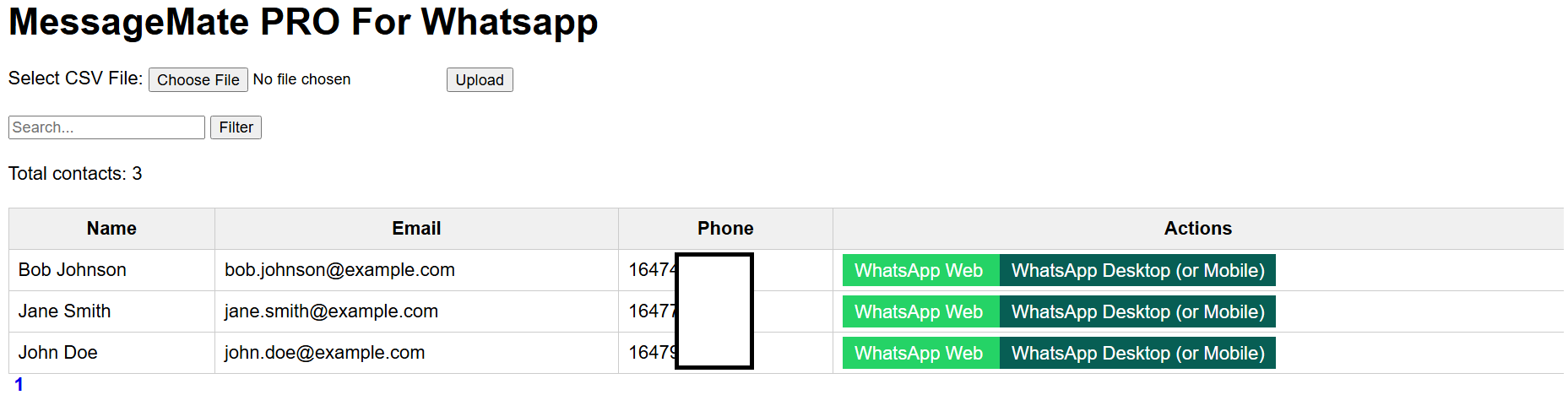
What the MessageMate PRO Can Do:
-
✅ Send 1-on-1 WhatsApp messages from your computer
-
✅ Attach images, videos, and documents from your desktop or tablet
-
✅ Track conversations and maintain a contact history
-
✅ Filter and manage your contacts using a searchable dashboard
-
✅ Avoid spammy bulk tools — this is real, personalized outreach
-
✅ Automate follow-up using AI (optional)
-
✅ Integrate WhatsApp with your CRM, email platform, or landing pages
Turn one article into an ongoing visibility engine.
PublicistBot can keep your business visible with monthly articles, search-friendly distribution, affiliate-aware sharing, and optional AI Marketer video content.
Learn How to Share This Article and Earn $1.00 per Free Enquiry
Ask PMN how referral-aware article sharing works, how eligible free enquiries are attributed, and how Social Rewards are tracked in your account.
The exact article is saved with the lead.
The featured offer or redemption link is preserved.
Owners receive messages and email notifications.
The applicant is connected to the campaign source.
It’s perfect for entrepreneurs, real estate agents, coaches, marketers, and anyone needing to message large lists — professionally and legally.
Behind the Scenes Setup — We Handle Everything
We’ll install and configure:
-
A website (Joomla-based) for contact management and automation
-
Blogging, landing page, membership, and learning management systems
-
CRM and email platform integration (Go High Level, BeeHiiv, MailChimp, etc.)
-
WhatsApp list management that pulls users directly from your site or CRM
All you need is:
-
A domain name
-
Website hosting
Both of which we can purchase on your behalf and configure. Once purchased, we handle everything else.
Bonus: Full Business Infrastructure
This isn’t just a WhatsApp tool — it’s a complete digital infrastructure for your business. Whether you’re launching a travel project, selling real estate, or building a content platform — your dashboard is the hub.
Investment & Timeline
-
Lifetime license for all installed software
-
Complete setup and integrations
-
Support with your existing EventBot AI automation
✅ Ready in a weekend — live within hours of receiving your domain + hosting access.
Ready to Try It?
Click below to see it in action:
WhatsApp Web | WhatsApp Desktop (or Mobile)
Need help creating custom links for your business, CRM, or landing pages?
Let’s build it for you — fast.
Want more optimized articles like this?
PMN can create and promote up to 120 PublicistBot articles per year for $299.99/year, with an optional AI Marketer video add-on that adds up to 720 videos for $250 per month more.
Learn How to Earn $90.00 When a User Activates PublicistBot AI Agents
Ask PMN about the PublicistBot referral process, eligibility, attribution, commission tracking and the steps required for a qualifying activation.
The exact article is saved with the lead.
The featured offer or redemption link is preserved.
Owners receive messages and email notifications.
The applicant is connected to the campaign source.